15 Dec, 2025
Everything You Need to Know About FM26 Update 26.1.1
All the fixes, all the features. This is Everything You Need to Know About FM26 Update 26.1.1 summarized quickly so you can get back to FM26.

FM26 Update 26.1.1 — What You Need to Know
If you’ve been following the rollercoaster that is Football Manager 26, there’s a new update out now that many in the community have been waiting for, around a week since their previous Update 26.1.0. Update 26.1.1 was recently rolled out by Sports Interactive across Steam, Epic, and the Microsoft Store, bringing a fresh round of fixes and improvements after earlier patches and beta testing. This patch isn’t huge in terms of flashy new features, but it’s significant because it addresses many of the niggles and odd behaviours that people have spotted since launch. Sports Interactive’s announcement comes amid widespread criticism from the community, and seeks to address many of the issues which still plague the game.
Whether you’re deep in a long-term save or just playing casually, this latest update is worth installing as soon as you can — even if it doesn’t rewrite the game from the ground up.
What’s Included in Update 26.1.1
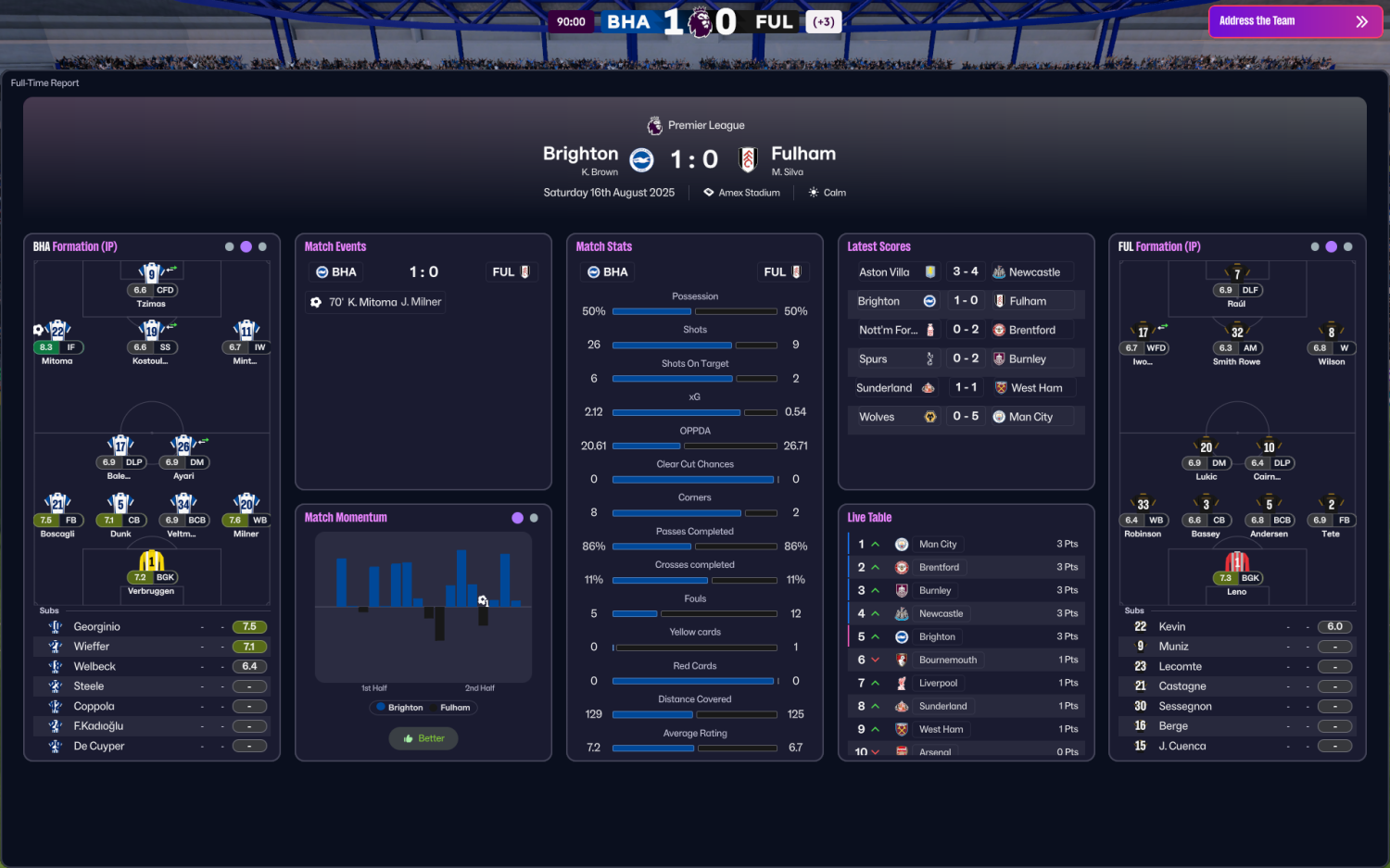
Unlike some patches that add major new modes or tools, FM26 26.1.1 focuses heavily on stability, UI fixes, and quality-of-life improvements. Across more than 300 changes, a lot of small but important issues have been fixed:
-
Various crash and stability problems have been addressed, which should make longer games feel smoother.
-
UI improvements include better halftime and post-match report screens, and fixes to unresponsive interface elements.
-
Some rare issues — like crowd noise continuing after matches or problems with loading certain saved games after switching out of the Public Beta — have been resolved.
-
Important gameplay and display fixes include making sure substitute lists, opposition instructions, and squad planners behave as they should.
-
Contract and transfer views are more reliable, especially around loan recall logic and player status updates.
-
A handful of features now behave more logically in various menus, helping reduce frustrating moments mid-game.
This isn’t a patch that fundamentally alters how you play, but it cleans up a lot of longstanding glitches and inconsistencies that people have been frustrated with.
| Name of Fix | Genre / Area | Details of the Fix |
|---|---|---|
| — TECHNICAL & STABILITY FIXES — | General technical, performance and stability fixes | |
| Crash & Stability Improvements | Technical | Various crash and stability issues fixed to improve overall reliability of the game. |
| Best of the Rest Softlock Fix | Technical | Fixed a softlock when selecting “Best of the Rest” club expectation and later removing it. |
| In-Game Item Timestamp Fix | Technical | Tactics, set pieces, shortlists and other saved items now display the correct save time. |
| Save Loading Issue Fix | Technical | Fixed a rare issue where certain save games could not be loaded after switching from the Public Beta Track. |
| Online Match Processing Timer | Technical / Online | Fixed an issue where the processing timer appeared incorrectly during online matches. |
| Crowd Noise Continuing After Match | Technical / Audio | Fixed rare cases where crowd noise continued after the match had ended. |
| Refined Match Shadows | Technical / Visuals | Improved shadow rendering during overcast matches for better visual clarity. |
| — USER INTERFACE (UI) FIXES — | Improvements and fixes across menus, screens and displays | |
| Half-Time Report Screen | User Interface | Improved layout and behaviour of the half-time report screen. |
| Post-Match Report Screen | User Interface | Improved reliability and clarity of the post-match report screen. |
| Past Match Report Display | User Interface | Fixed issues with viewing past match reports. |
| Unresponsive Shout Button | User Interface | Fixed UI becoming unresponsive after selecting the same Team Talk shout twice. |
| Weather Text Duplication | User Interface | Fixed weather description appearing twice on Team News screens. |
| Live Table Expand Button | User Interface | Fixed expand button not functioning correctly on Live Table view. |
| +/- Button Visibility | User Interface | Fixed cases where plus/minus buttons would disappear unexpectedly. |
| Set Piece Taker List | User Interface | Players who have left the club no longer appear as set piece taker options. |
| Squad Planner Position Saving | User Interface | Selected position now saves correctly within the Squad Planner. |
| Player Search Columns | User Interface | Added additional columns to Player Search in Scout > Transfer view. |
| Choose Visuals Dropdown | User Interface | Added “Choose Visuals” option to Player Report performance data screen. |
| Staff Attributes Display | User Interface | Staff attributes now visible on Club Staff screens. |
| Deadline Day Offers | User Interface | Transfer offers received on Deadline Day must now be responded to. |
| Opposition Report Form Tooltip | User Interface | Added tooltip explaining “Form” within Opposition Reports. |
| Youth Candidates Sorting | User Interface | Youth Candidates portal message now sorts players by rating category. |
| B Team Average Age Display | User Interface | Fixed incorrect average age display in B Team portal messages. |
| League Player Stats Sorting | User Interface | Sorting by position now works correctly in League > Player Stats. |
| Coaching Conditions Filter | User Interface | Coaching Conditions filter now works in the Player Database. |
| Scout Filter Accuracy | User Interface | Scout filters no longer show players who do not meet criteria. |
| Suggested XI Confirmation | User Interface | Confirming Suggested XI from portal messages now works correctly. |
| Pre-Match Continue Button | User Interface | Fixed Continue button not appearing on the pre-match Team Talk screen. |
| Graphic Quality Dropdown | User Interface | Fixed Graphic Quality dropdown not opening in Preferences. |
| Shortlist Message Reports | User Interface | Fixed sending re-scouted player reports to Messages from Shortlist. |
| Delegation Tab Reset | User Interface | Fixed issue preventing delegation tabs from resetting correctly. |
| NXGN / Top Player News | User Interface | Fixed award candidate news not showing all shortlisted players. |
| Match Caption Own Goals | User Interface | Own goals now display correctly in match pop-up captions. |
| Subbed-Off Player Menu | User Interface | Removed substituted players from right-click Match Tactics menu. |
| Match Tactics Substitution | User Interface | Fixed inability to make substitutions via squad bar during matches. |
| Ticket Price Display | User Interface | Fixed new season ticket price display incorrectly showing 0%. |
| — GAMEPLAY & MATCH ENGINE FIXES — | Gameplay logic, match behaviour and rules | |
| Opposition Instructions Line-Up | Gameplay | Correct opposition line-up now displays during matches. |
| Captain Indicator | Gameplay | Captain indicator now appears correctly in UEFA competition graphics. |
| TransferRoom Out Improvements | Gameplay | Improved behaviour when offering players out via TransferRoom Out. |
| Transfer Budget Update | Gameplay | Transfer budget now updates instantly after clause-related sales. |
| Player Transfer Status | Gameplay | Player transfer status updates immediately when removed from lists. |
| Loan Player Wage Display | Gameplay | Squad screen now shows correct wage for loan players at loan club. |
| Contract Demand Display | Gameplay | Fixed incorrect contract demands shown after agent market interest check. |
| Expiring Contract Icon | Gameplay | ‘i’ icon now appears correctly in expiring contract portal messages. |
| Contract Negotiation Button | Gameplay | Contract negotiation button no longer active if a pre-contract is signed. |
| Future Fee Loan Details | Gameplay | Full details of loan deals with future fees now display correctly. |
| Individual Training Sorting | Gameplay | Sorting by position now works in Individual Training screen. |
| Recruitment Focus Coverage | Gameplay | Recruitment Focus can now be created for all active competitions. |
| Mentoring Group Creation | Gameplay | Assistant Manager can now correctly create mentoring groups. |
| Makeshift Position Badge | Gameplay | Added ‘Makeshift’ positional rating icon for players. |
| — AI & PLAYER LOGIC FIXES — | Improvements to AI behaviour and decision-making | |
| Player Contract Logic | AI / Gameplay | Improved logic for players wanting new contracts, staff renewals, and older player contracts. |
| Backup Player National Team Logic | AI / Gameplay | Fixed backup players demanding excessive playing time for national team consideration. |
| Elite Club Promise Logic | AI / Gameplay | Reduced frequency of elite players demanding Domestic Trophy promises. |
| AI Loan Back Offers | AI / Gameplay | Fixed unrealistic playing time promises in AI loan-back offers. |
| Loan Recall Logic | AI / Gameplay | Players are no longer recalled if a loan club triggers a buy clause. |
| European Qualification Fee Trigger | AI / Rules | Fixed future fee triggers related to European qualification. |
| Captain / Vice-Captain Conflict | AI / Rules | Fixed issue where a player could demand to be both captain and vice-captain. |
| — IN-GAME EDITOR FIXES — | In-Game Editor usability and functionality | |
| Editor Header Bar Update | In-Game Editor | Header bar now updates instantly after transfers made via editor. |
| Corporate Facilities Rating | In-Game Editor | Fixed issue editing Corporate Facilities rating. |
| Fee Adjustment Button | In-Game Editor | ‘+’ button next to fee amounts now works correctly. |
| Editor Dropdown Tabs | In-Game Editor | Dropdowns converted into functional tab views. |
| Editor Icon Availability | In-Game Editor | Fixed issue where editor icon became disabled incorrectly. |
How to Install It — Step by Step
Installing the update is straightforward, but the exact steps depend on where you own FM26:
-
On PC (Steam):
-
Close Football Manager 26 completely if it’s running.
-
Restart Steam and let it check for updates — the patch should download automatically.
-
If you were on the Public Beta Track previously, you can revert to the retail version if you want the stable release instead.
-
-
On Epic / Microsoft Store:
-
Open the launcher and go to your library.
-
Look for the FM26 update prompt and let it download and install.
-
Restart the game once the update finishes.
-
-
On Console:
-
Updates should trigger automatically when you start the game — if not, check the game in your library and hit “Update.”
-
-
On Touch / Mobile:
-
The update is expected to come later in the new year across those platforms due to critical issues found in earlier builds.
-
Because FM26 patches are save game compatible, you don’t need to start a new career after installing.
Community Reaction
Fans of FM26 have had, let’s say, a mixed relationship with the game so far. Many players were frustrated at launch due to bugs, missing features, and a redesigned UI that took some getting used to. Some long-time managers felt it wasn’t up to the usual standards.
That said, this update has been greeted with a bit more positivity. A lot of players have commented that just having clear fixes for stability and UI issues shows Sports Interactive is listening, especially after a series of beta tests and patch cycles. There’s also appreciation that the team is communicating more about what’s being fixed and what remains on the roadmap.
“Like many, I was initially not a huge fan of the revamped UI. But once I got used to it and knew how to navigate it, I believe the UI is better than before, much more modern and with the potential to be even better with improves use of space.”
Said one user on the SI forum.
Of course, not everyone is celebrating — some feel the game still needs more structural improvements before it feels truly polished — but overall the reaction is a step in the right direction.
What’s Next? Future Plans and Expectations
According to the official notes, updates for FM26 Console and FM26 Touch are planned for the new year. These platforms were held back this side of Christmas due to compatibility issues spotted in earlier testing.
Beyond that, the community is watching for:
-
Continued bug fixes and gameplay tweaks
-
UI refinements for clarity and usability
-
Further match engine polish and tactical depth enhancements
-
Potential feature returns that were missing at launch
Sports Interactive has made it clear that they intend to keep the game supported long-term, and while 26.1.1 doesn’t rewrite the game, it lays groundwork for smoother patches ahead.
Make sure you stay up to date with all FM26 updates and news on our Feature Articles section.