13 Nov, 2025
Eveything You Need to Know about FM26 Update 2 – Is Football Manager Back?
FM26 Update 2 is finally here, and we might just have our game back.
FM26 Update 2 is here, and following mixed reviews from the previous 26.0.04 update,this had to be a good one.
The second major update for Football Manager 2026 (FM26) has arrived via the Steam Public Beta track, and it’s one of the most significant steps Sports Interactive has taken to stabilise the new-era Football Manager engine. From long-requested UI improvements to key crash fixes, Update 2 shows the studio doubling down on performance, playability, and player trust after a turbulent launch.
Below, we break down what’s new, how to install it, how the community reacted, and what future updates we can expect.
What Changed in the FM26 Update 2 (November 2025)
The latest patch is a sweeping stabilisation effort focused on polishing UI components, addressing crashes, and improving match performance across all platforms.
Key changes include:
-
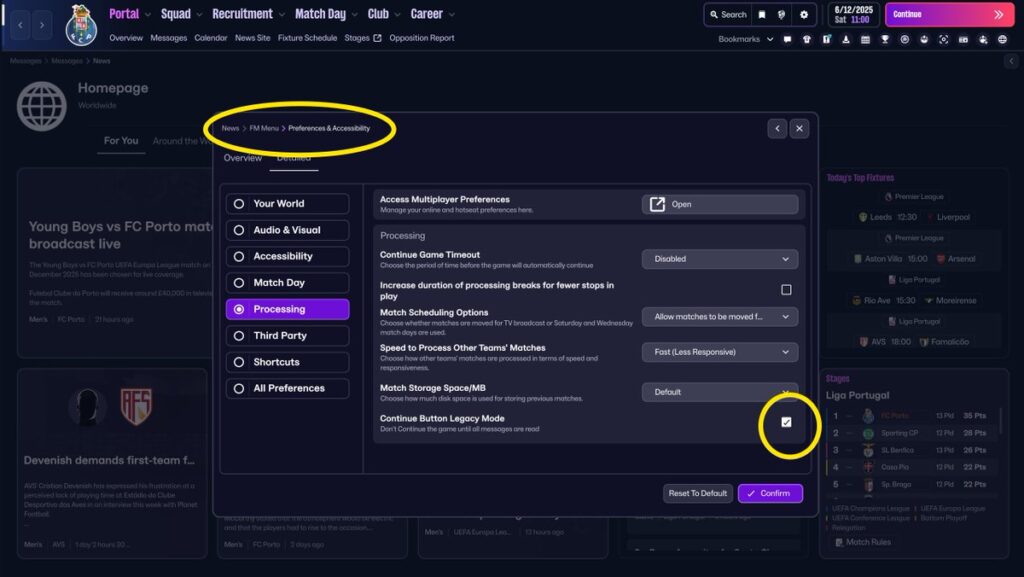
UI and Navigation Improvements – Sports Interactive restored the ability to navigate with the space bar (a long-time fan request) and delivered wide-ranging tile alignment and polish fixes.
-
Match Engine Stability – Multiple crash scenarios were resolved, including those triggered by match-day freezes, M1/Intel Mac start-up errors, and club affiliation changes through the Pre-Game Editor.
-
Quality of Life Tweaks – Fixes to the “Arrange Friendly” option, proper saving for multiple starting elevens, and scroll-state memory enhancements for smoother usability.
-
Regional Rule Corrections – Updates for the J.League’s match regulations, MLS designated-player rules, and other regional competitions that previously caused simulation inconsistencies.
-
Performance Boosts – General optimisation to reduce lag spikes and improve responsiveness, particularly during match simulations.
Sports Interactive’s official post confirmed these were “the most reported issues by players since launch”, signalling a focus on listening to feedback rather than introducing new features.
Every Change in FM26 Update 2
| Category | Change / Fix Description |
|---|---|
| General Performance | Improved overall stability and reduced crash frequency across PC, Mac, and console versions. |
| Crash Fixes | Fixed crash when adding club affiliation via Pre-Game Editor (PGE). |
| Crash Fixes | Fixed crash on M1/Intel Mac when starting a match. |
| Crash Fixes | Fixed freeze during single-player and online matches. |
| Crash Fixes | Fixed crash when exiting to desktop from match engine screen. |
| Crash Fixes | Fixed rare crash caused by player transfer negotiations on deadline day. |
| Match Engine | Improved match-day performance and reduced lag spikes during simulations. |
| Match Engine | Corrected AI substitutions logic during extra time. |
| Match Engine | Fixed issue where some tactical instructions failed to apply mid-match. |
| Match Engine | Corrected animation stuttering during corner and free-kick routines. |
| User Interface (UI) | Added Legacy Navigation Option — players can now use the space bar to continue through message cards. |
| User Interface (UI) | Fixed multiple tile/card alignment issues throughout menus. |
| User Interface (UI) | Corrected overlap of player attributes when resizing windows. |
| User Interface (UI) | Fixed missing tooltips on training screen sliders. |
| User Interface (UI) | Improved colour contrast in scouting and inbox screens for better accessibility. |
| User Interface (UI) | Fixed scroll bar resetting when switching between player profiles. |
| User Interface (UI) | Enhanced responsiveness of “Continue” button when processing multiple days. |
| User Interface (UI) | Fixed issue where shortlist icons displayed incorrectly after saving game. |
| User Interface (UI) | Fixed “Arrange Friendly” option not appearing in team schedule screen. |
| Quality of Life | Fixed bug preventing saving of multiple starting elevens in tactics. |
| Quality of Life | Fixed issue where fixture list displayed duplicate matches. |
| Quality of Life | Adjusted text wrapping in club vision objectives to prevent truncation. |
| Quality of Life | Fixed progress bar occasionally sticking at 100% on match load. |
| Editor / Data | Fixed data crash when modifying affiliations or competition rules. |
| Editor / Data | Corrected transfer windows for MLS and A-League to reflect 2025-26 season data. |
| Editor / Data | Fixed wage budget misalignment after database edits. |
| Regional Rules | Fixed Japanese J.League match rules regarding foreign player limits. |
| Regional Rules | Fixed USA designated player rule not correctly calculating budget impact. |
| Regional Rules | Fixed South American continental registration bug when signing U21 players. |
| Online / Multiplayer | Fixed desyncs during live draft sessions. |
| Online / Multiplayer | Fixed freeze when users simultaneously request match highlights. |
| Online / Multiplayer | Improved stability for online career saves with 10+ participants. |
| Console-Specific | Fixed frame-rate drops on PlayStation 5 during match-engine camera pans. |
| Console-Specific | Fixed crash when suspending game from Xbox quick-resume. |
| Console-Specific | Adjusted UI scaling for smaller display resolutions. |
| Mac / Linux | Fixed rendering issues when running in windowed mode. |
| Mac / Linux | Fixed unexpected resolution changes when using external monitors. |
| Audio / Visuals | Fixed missing stadium crowd ambience on smaller club grounds. |
| Audio / Visuals | Adjusted commentary timing to better sync with highlight events. |
| Tactics | Fixed issue preventing “Attacking Width” instruction from saving correctly. |
| Tactics | Corrected pressing triggers not activating with certain formations. |
| Tactics | Fixed duplicated tactical presets appearing after importing user setups. |
| Training | Fixed staff assignments not saving when swapping assistant managers. |
| Training | Adjusted workload calculation to better reflect intensity levels. |
| Scouting | Fixed search filters not resetting after database updates. |
| Scouting | Fixed incorrect star ratings after editing potential ability. |
| Transfers / Contracts | Fixed player wage demands not updating after promotion/relegation. |
| Transfers / Contracts | Fixed issue with loan expiry notifications not triggering. |
| Transfers / Contracts | Adjusted AI club spending logic for free agents. |
| Board & Finances | Fixed misreporting of balance sheet totals after season rollover. |
| Board & Finances | Fixed board confidence occasionally displaying “N/A” on mid-season review. |
| Competitions | Fixed cup replays being scheduled incorrectly on international breaks. |
| Competitions | Corrected promotion playoff rules for several European leagues. |
| Youth Development | Fixed youth intake preview not updating after scouting assignments. |
| Youth Development | Adjusted newgen attribute distribution for balance across nationalities. |
| Miscellaneous | Fixed missing Steam achievements for certain milestones. |
| Miscellaneous | Improved tooltip clarity across multiple screens. |
| Miscellaneous | General code cleanup and performance tuning. |
How to Update Football Manager 2026 (Steam Public Beta Installation Guide)
Unlike standard patches, FM26 Update 2 is currently being distributed via the Steam Public Beta branch, meaning players must opt in manually before the update goes fully live.
To access the update:
-
Open Steam and go to your Library.
-
Right-click Football Manager 2026 → select Properties.
-
Under the Betas tab, choose public-beta – Public Beta Version.
-
The game will update automatically.
-
Once the official version is released, you can switch back to the default branch.
Sports Interactive recommends backing up saves before updating to avoid compatibility issues, as early beta builds may still receive small hotfixes in the coming days.
The Community’s Reaction: Relief, Frustration, and Cautious Optimism
The FM community’s response to Update 2 has been a mix of relief and restraint. Just hours after Korea’s biggest FM streamer quit the game.
Long-time players on the official forums and Reddit praised the inclusion of the space-bar navigation toggle and general interface refinements. Many noted that, for the first time since launch, the new UI “feels like Football Manager again.”
However, frustrations linger. Several community threads highlighted remaining issues such as sluggish menus, inconsistent match-speed syncing, and unresolved online desync bugs. Some users criticised Sports Interactive for “fixing what should have been right from day one,” reflecting ongoing scepticism after FM25’s cancellation and FM26’s rocky rollout.
Still, the tone overall is trending positive, and is centrainly better than the reaction to the previous update. The studio’s transparent patch notes, weekly dev communication, and targeted fixes are slowly rebuilding confidence.
FM26 Roadmap: Upcoming Patches, Dates, and What’s Next
In a follow-up post titled “Our Planned Approach for FM26 Updates”, Sports Interactive outlined a more structured update cycle moving forward.
Key points from the roadmap include:
-
Weekly or Near-Weekly Updates – Patches focusing on stability, performance, and UI responsiveness through December 2025.
-
Pass Maps and Analytics Overhaul – A deeper tactical visualisation update is being “actively evaluated” for a later patch.
-
Console Parity – Xbox and PlayStation versions are receiving targeted lag and crash fixes by the end of the year.
-
Long-Term UI Overhaul – The developers acknowledged “some areas require too many clicks to access,” confirming ongoing refinements for early 2026.
Sports Interactive emphasised that FM26 is the foundation for future innovation, meaning much of the current work is groundwork for smoother, more advanced editions in the next cycle.
Final Take
FM26 Update 2 isn’t revolutionary, but it’s restorative — a patch that steadies the ship and reassures a passionate but weary player base. While community patience remains thin, Sports Interactive’s shift to consistent communication and incremental polish suggests a studio aware of its missteps and determined to rebuild trust.
If you’re still deciding whether to jump back in, now’s the right moment — FM26 finally feels playable again, and the future updates promise to refine it even further.
Make sure you check out our Feature Articles Section to stay up to date with all FM News and Updates