17 Feb, 2026
How to get the skin that saves FM26
Learn how to download and install the must-have skin that transforms your FM26 experience. Step-by-step guide to the skin every manager needs.
If you’ve been anywhere near the Football Manager community over the past couple of weeks, you’ll probably have seen one name popping up again and again… MrTini23.
His new FM26 skin has been doing the rounds among some of the biggest creators in the scene, with plenty of people saying it completely transforms how Football Manager 26 looks and feels. After installing it myself over the weekend, I can safely say they’re not exaggerating, it’s a massive visual upgrade.
Will it single-handedly “save” FM26 for players who already gave up on the game? That depends. If you found the UI so frustrating that you couldn’t get past it, this might not fix everything overnight. But if you’re still on the fence, or you just want FM26 to look more like the Football Manager you know and love, it’s absolutely worth trying.
In this article, I’ll walk you through where to download the skin, how to install it, and where to find other community-made skins that can improve your experience too.
Before you start… join the Discord
One thing I’d strongly recommend before installing anything is joining the Skin Builder Discord.
If you run into problems, get stuck during installation, or just want advice, the community there is genuinely helpful. Post your question in the FM skin builder channel and someone will usually point you in the right direction quickly.
The skin
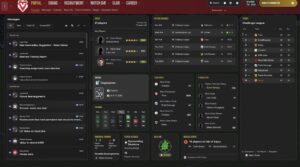
Above is a screenshot from my own save using MrTini23’s skin (logos are downloaded separately via a logo pack).
One of the biggest criticisms of FM26 has been its user interface, and this skin goes a long way towards addressing that. Menus feel cleaner, screens look more modern, and the whole game is simply easier on the eye.
More importantly, it brings back a bit of that classic Football Manager feel, the kind of immersion many players think has been lost in FM26’s default presentation.
You can download the skin here, along with full installation instructions.
How to install skins on Mac and PC
Installing skins on FM26 is a bit more involved than it used to be, especially on Mac.
I’ll be honest: getting it working on my own Mac took a bit of learning. If you’re confident digging around in folders and game directories, you’ll be fine but if you’re not particularly technical, these tutorials make the process much easier.
Two excellent video guides have been created:
They’re well worth watching before you start moving files around.
Making your own skin
One of the most impressive things about MrTini23’s work is that it was created using the Skin Builder tool.
That means you’re not limited to downloading other people’s skins, you can actually build and customise your own.
It’s definitely more advanced than simply copy-and-pasting a finished skin into the right folder, but the fact it’s even possible is a huge step forward for FM26 modding.
Here’s the download link for the Skin Builder tool and here’s a detailed guide which takes you through how to use it fmskinbuilder.com
It’s also worth pointing out:
Most skins don’t require the Skin Builder at all. Many come as pre-patched bundles that you can paste straight into the correct directory. However, those versions don’t allow for deeper customisation.
The Skin Builder is what gives creators the ability to edit source files, tweak layouts, and even build entirely new skins from scratch.
Other skins worth checking out
MrTini23’s skin might be one of the best available right now, but it’s far from the only option.
The Skin Builder community has already produced a growing directory of skins, all offering different styles, whether you want something cleaner, more classic, or completely different from FM26’s default look.
If you fancy browsing through what’s out there, there’s a whole library of community creations to explore.
Conclusion
FM26 has left a lot of players disappointed, particularly when it comes to the UI and overall presentation.
But once again, the Football Manager modding community is doing what it always does: stepping in and dragging the game closer to what fans actually want.
MrTini23’s skin is one of the clearest examples yet of how much better FM26 can look with a bit of community effort behind it.
If there’s anything I’ve missed, or if there are other skins, tools, or mods you think deserve a shout, feel free to get in touch because this is exactly the kind of work that’s making FM26 worth coming back to